Navigating the vast, blocky landscapes of Minecraft is an adventure unto itself. But let's be honest, sometimes you're not in the mood for an epic trek across thousands of blocks just to find a village or that elusive stronghold. Whether you're a seasoned builder, a speedrunner, a resource-hungry survivor, or just someone who wants to know what their world holds, mastering the art of locating structure seeds for villages, strongholds, temples, and shipwrecks can transform your gameplay. It’s about leveraging the hidden blueprints of your Minecraft world to find exactly what you need, exactly when you need it.
No more aimless wandering, no more endless digging. We're going to equip you with the knowledge and tools to pinpoint critical structures with precision, turning guesswork into guaranteed success.
At a Glance: Your Structure-Finding Toolkit
- World Seed is Key: Every Minecraft world has a unique number (its "seed") that dictates its generation. This is your starting point.
- External Tools Reign Supreme: Websites like Chunkbase and MCSeedMap are your best friends for finding structures, biomes, and more across Java and Bedrock editions.
/locateCommand: The In-Game Ace: If cheats are enabled, Minecraft's built-in command provides quick coordinates for many structures.- Version Matters: Always ensure your chosen tool matches your game version (Java or Bedrock) for accurate results.
- Beyond Structures: These tools also reveal biomes, specific ore locations, and help you plan custom worlds.
- Adventure vs. Efficiency: Choose between manual exploration and strategic finding based on your play style and goals.
Why Bother with the Blueprint? Unlocking Your World's Potential
Imagine needing a village for trading, but you're thousands of blocks from spawn with no sign of civilization. Or you're ready to face the Ender Dragon, but finding a stronghold is proving more challenging than the fight itself. This is where "structure finding" comes in. It's not about cheating the system; it's about understanding the system. Every Minecraft world, from the moment it's created, follows a deterministic generation pattern. That pattern is defined by its "seed." By knowing this seed and using the right tools, you gain a map to every significant landmark.
This approach offers immense advantages:
- Saving Time and Effort: No more hours spent searching for specific biomes, villages, or strongholds.
- Resource Efficiency: Quickly locate vital resources like diamonds, ancient debris, or specific wood types.
- Strategic Planning: Builders can identify ideal locations for mega-projects, while explorers can chart their course through specific biomes.
- Speedrunning: For those racing against the clock, knowing exact structure locations is non-negotiable.
- Avoiding Frustration: Sometimes, you just want to get to the good stuff without the grind.
Think of it as having the architect's plans for your randomly generated world. You're not changing the world; you're simply reading its pre-determined layout.
The Digital Cartographers: Your Go-To Structure Finder Tools
The primary way to locate structures using your world's seed is through external web-based tools. These powerful utilities process your seed and render an interactive map, revealing points of interest far beyond what your in-game map can show.
Compatibility: A Crucial First Check
Before diving into any tool, confirm you're using the correct version:
- Minecraft Java Edition (PC/Mac/Linux): Most tools support Java, offering comprehensive structure, biome, and ore finding. The
/seedcommand in-game is your quick way to get your world's seed. - Minecraft Bedrock Edition (Phone, Tablet, Console, Windows 10/11): Many popular tools now fully support Bedrock. Just ensure you select "Bedrock" or "MCPE" when prompted. Your world seed is found in the world's settings menu.
- Minecraft Servers: To use a finder on a server, you'll need the server's seed. If you own the server, you can usually find it in the server properties file or by using
/seedif you have op permissions. If you don't own it, you'll need to ask the server owner – and always respect their rules regarding such information.
A Pro Tip: Double-check the Minecraft version the tool supports (e.g., 1.19, 1.20) against your game's version. While structure generation broadly follows similar rules across updates, specific spawn patterns or biome distributions can change, leading to inaccuracies if you're using an outdated tool setting.
Your Arsenal of Structure Finders:
- Chunkbase: This is arguably the most popular and versatile structure finder out there.
- Features: Supports both Java and Bedrock, major Minecraft updates, and can find villages, strongholds, temples, shipwrecks, woodland mansions, ancient cities, biomes, slime chunks, and even specific ore veins.
- Ease of Use: Very user-friendly interface. Just plug in your seed, select your version, and pick what you want to find.
- Why it's great: Its interactive map makes visualizing distances and relationships between structures incredibly simple.
- MCSeedMap: Another robust option that covers the essentials.
- Features: Offers Java and Bedrock support for structures and biomes.
- Why it's great: A reliable alternative if Chunkbase is down or you prefer a different interface.
- Diamond Finder (Android App): For Bedrock (Pocket Edition) players on Android, this dedicated app streamlines the process.
- Features: Focuses on Bedrock, helping find structures, biomes, and especially ores.
- Why it's great: Convenient for mobile players, often providing a more integrated experience than a web browser.
- MinecraftForum/Community Sites: While not a dedicated "finder" tool in the same vein as Chunkbase, community forums often host lists of curated seeds known for specific structures or biome layouts.
- Features: Community-driven, often focused on Java Edition, good for finding interesting seeds to start new worlds.
- Why it's great: Discover unique and pre-vetted worlds shared by other players.
Your Adventure Starts Here: A Step-by-Step Guide to Using Structure Finders
Using a structure finder is straightforward once you know the general flow. Let's break it down:
- Retrieve Your World Seed:
- Java Edition: Open chat (press 'T') and type
/seed. The game will output a string of numbers (and sometimes letters). Copy this. - Bedrock Edition: Go to your world's settings. Scroll down, and you'll find the "Seed" displayed there. Jot it down or copy it.
- Open Your Preferred Tool: Navigate to Chunkbase, MCSeedMap, or your chosen app/website.
- Enter Your Seed: Paste or type your world seed into the designated input field. Be very careful with accuracy; even a single digit wrong will produce an entirely different map.
- Select Your Game Version and Dimension: This is critical!
- Choose "Java" or "Bedrock" (or "MCPE").
- Select the dimension: "Overworld," "Nether," or "End." Most structures you're looking for (villages, strongholds, temples, shipwrecks) are in the Overworld, but strongholds also lead to the End Portal room, and Nether fortresses are in the Nether.
- Pick Your Target: Use the tool's dropdowns or checkboxes to select what you're looking for. This could be "Village Finder," "Stronghold Finder," "Ocean Monument Finder," or even "Biome Finder."
- Analyze the Map and Get Coordinates:
- The tool will display a map with markers for your chosen structures.
- Click on a specific marker, and the exact X, Y, and Z coordinates will typically appear. The Y-coordinate (height) is usually less critical for surface structures but vital for things like mineshafts or deep ores.
- Note these coordinates down.
- Go There In-Game:
- Manual Travel: Open your F3 debug screen (Java) or enable coordinate display in world settings (Bedrock) to track your position. Start walking, sailing, or flying towards the coordinates. This is the "purest" survival method.
- Teleportation (if cheats are enabled): If you've enabled cheats (either in a single-player world or if you have op permissions on a server), you can use the
/tpcommand. For example,/tp @p X Y Z(replace X, Y, Z with your coordinates). Java often provides clickable teleport coordinates directly in chat after using/locate.
Safety First: Heading to a structure, especially a dangerous one like a Woodland Mansion or an Ocean Monument, requires preparation. Always bring a map, plenty of food, strong armor, weapons, and potentially potions or specialized gear (like water breathing for monuments). You're going straight to the action, so be ready!
Pinpointing the Prizes: Finding Specific Structures and Elements
Let's get specific about how to find the structures most players are looking for.
Villages: Your Hubs of Trade and Comfort
Villages are invaluable for trading, iron farms, and a sense of civilization.
- How to Find: Simply enter your seed into Chunkbase or MCSeedMap, select "Village Finder," and watch them pop up on the map. Click for precise coordinates.
- Where They Spawn: Villages typically generate in plains, savanna, taiga, snowy plains, and desert biomes. If you're struggling to find one manually, first locating these biomes with a biome finder can narrow your search.
- Beyond Coordinates: Once you know the location, you can plan an efficient route. Consider building a railway or setting up a nether portal network to link distant villages. For more strategies, consider delving deeper into village mechanics.
Strongholds: The Gateway to the End
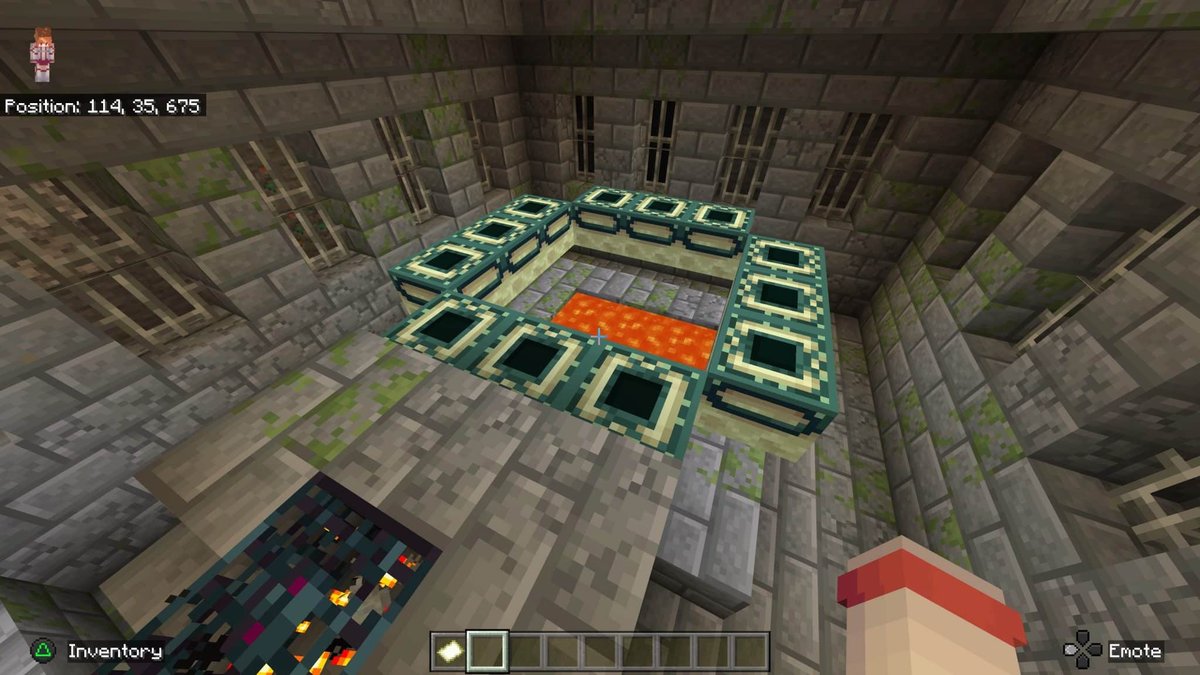
The stronghold houses the End Portal, your path to the Ender Dragon. Finding one traditionally involves Eyes of Ender, which can be tedious.
- How to Find: Use Chunkbase or MCSeedMap, select "Stronghold Finder." Strongholds are quite rare, so the map might show only a few, often thousands of blocks apart.
- Key Detail: Strongholds typically generate in rings around the world origin (0,0). While finders will give you exact coordinates for the surface above them, remember that strongholds are underground structures. You'll need to dig down once you reach the given X,Z coordinates.
- The End Portal Room: The finders will lead you to a stronghold, but locating the End Portal room within its labyrinthine corridors is still part of the adventure. For expert tips on mastering the hunt for strongholds, check out advanced guides.
Temples: Loot, Traps, and Unique Architecture
Minecraft features several types of temples, each with its own quirks:
- Desert Temples (Pyramids): Found in desert biomes, these contain valuable loot (and a TNT trap, so dig carefully!).
- Jungle Temples: Hidden deep within jungle biomes, these have tripwire traps and puzzle mechanisms.
- Ocean Monuments: Massive underwater structures guarded by Elder Guardians, offering sponges and prismarine blocks. Requires specific gear (Water Breathing, Respiration, Depth Strider) to tackle effectively.
- How to Find: Most structure finders have specific options for "Desert Temple," "Jungle Temple," and "Ocean Monument." Enter your seed, select your target, and head to the coordinates. For Ocean Monuments, the Y-coordinate will be deep underwater, so be prepared for a plunge!
Shipwrecks: Underwater Treasures
Shipwrecks are fantastic sources of early-game loot, including treasure maps, food, and various blocks.
- How to Find: Use Chunkbase or similar tools with a "Shipwreck Finder" option. They generate in ocean biomes.
- Exploration Tip: Keep an eye out for buried treasure maps inside shipwrecks. These maps lead to buried chests often containing valuable diamonds, iron, and gold.
Beyond Just Structures: Finding Biomes, Ores, and Planning Worlds
Structure finders aren't just for buildings; they're comprehensive world analysis tools.
- Biomes: Need a specific biome for a build, an animal farm, or a resource? Tools like Chunkbase's "Biome Finder" highlight all biome types on the map after you enter your seed. Rare biomes, like mushroom fields or badlands, become easy to locate.
- Diamonds and Ores: Some tools, like Diamond Finder or Chunkbase's "Cave Finder" (which often highlights ore veins), show ideal digging spots. They can reveal where to find diamonds, netherite, gold, iron, and copper.
- Optimal Y-Levels for Ores:
- Diamond: Y-level -59 (start digging around -58).
- Iron: Y-levels 15 and 232 (peaks for iron ore).
- Gold: Y-level -18.
- Copper: Y-level 48.
- Ancient Debris: Y-level 15 in the Nether.
- Pro Tip: Always bring a Fortune pickaxe when mining precious ores to maximize your yield. To optimize your ore farming strategy, combine coordinate finding with efficient mining techniques.
- World Seeds: If you're starting a new world, seed finders allow you to preview various random or specific seeds. You can see the initial spawn, nearby biomes, and structure locations before ever loading the game. This is invaluable for creating custom worlds perfectly suited to your playstyle. Since Minecraft 1.18, Java and Bedrock often share similar terrain and biome generation for the same seed, though exact structure placement can still vary slightly. For unique world ideas, you can always generate your Minecraft seeds and explore them with these tools.
The In-Game Ace: Using /locate Commands
Sometimes, you don't even need an external website. Minecraft has its own built-in /locate command, perfect for quick searches if cheats are enabled.
- Enable Cheats: This is the prerequisite. For a single-player world, you can open it to LAN and enable cheats, or create the world with cheats enabled from the start. On a server, you need operator (op) permissions.
- Open Chat: Press 'T' (Java) or the chat icon (Bedrock).
- Type the Command:
- For structures:
/locate structure <structure_name> - Examples:
/locate structure village,/locate structure stronghold,/locate structure desert_pyramid,/locate structure ocean_ruin,/locate structure shipwreck,/locate structure ancient_city - For biomes (Java Edition only):
/locate biome <biome_name> - Example:
/locate biome snowy_plains
- Get Coordinates: The game will output the coordinates of the nearest instance of that structure or biome.
- Java Edition Advantage: Java's
/locatecommand often provides clickable coordinates right in the chat window, allowing you to instantly teleport to the location with a single click. This is incredibly efficient. - Bedrock Edition: You'll get the coordinates, but you'll have to manually type out the
/tpcommand (e.g.,/tp @p X Y Z) to get there. Bedrock supports/locatefor most major structures, though some rarer ones or specific biome names might not be available compared to Java.
Using/locateis an excellent choice for immediate gratification, especially for finding a quick village or the nearest stronghold without leaving your game. However, it only shows the nearest one, not all of them on a map, which is where external finders excel for planning. You can also explore using advanced teleportation commands for more precise travel options.
The Great Debate: Manual Exploration vs. The Finder's Edge
This is a discussion as old as Minecraft itself: Is it "cheating" to use structure finders?
- Manual Exploration Pros:
- Adventure and Discovery: There's an undeniable thrill in stumbling upon a massive cave system or a hidden temple purely by chance.
- Sense of Accomplishment: Earning your way to an End Portal after a long search feels incredibly rewarding.
- Organic World Interaction: You engage with the world as it's presented, fostering a deeper connection.
- No External Tools: You don't need to leave the game or rely on third-party websites.
- Structure Finder Pros:
- Efficiency: Saves countless hours of searching, perfect for focused goals.
- Planning Power: Ideal for large builds, specific farm setups, or speedrunning.
- Resource Management: Quickly find what you need to progress, reducing grind.
- Eliminates Frustration: When you've explored for hours to no avail, a finder can restore your enjoyment.
Our Recommendation: A balanced approach is often the most satisfying. Start with manual exploration. Enjoy the journey, the unexpected discoveries, and the challenge. If you hit a wall, need a specific resource for a project, or are short on time, then bring out the structure finder. It becomes a problem-solving tool, not a crutch.
Ethical Considerations for Multiplayer
In single-player, the choice is entirely yours. Minecraft is a sandbox; play it your way. In multiplayer environments, however, there's an important ethical consideration:
- Server Rules: Always adhere to the specific rules of the server you're playing on. Some servers explicitly forbid the use of structure finders, viewing it as an unfair advantage or disruptive to the intended gameplay. Others may allow it, especially for public resources.
- Respect the Experience: Using a finder on a server where others are actively trying to explore organically can diminish their experience.
Ultimately, structure finders simply reveal what already exists in a generated world. They're like having a detailed map, not changing the terrain. The "right" way to play is the way that brings you and your community the most enjoyment.
Mastering the Hunt: Tips for Efficient Structure Finding
To get the most out of your structure-finding efforts, keep these pointers in mind:
- Always Verify Your Version: This can't be stressed enough. A Java seed in a Bedrock finder (or vice-versa) will yield garbage results.
- Double-Check Your Seed: Copy-pasting is your friend. One wrong character means a completely different world.
- Leverage Teleportation (When Appropriate): If cheats are enabled, teleporting is the fastest way to verify a location or get straight to a distant structure. Just remember the safety tips!
- Gear Up for Danger: Assume any major structure (Stronghold, Ocean Monument, Woodland Mansion, Ancient City) will be dangerous. Go prepared with armor, weapons, food, and specific tools (e.g., water breathing potions for underwater).
- Understand Biome Specificity: Many structures only spawn in certain biomes (e.g., Desert Temples in deserts). Combining a biome finder with a structure finder can give you a better overall picture.
- Use Filters Wisely: Most finders allow you to filter for multiple structures or biomes at once. Use this to find a village near a jungle, for instance.
- Explore Your Spawn Area First: Even with a finder, it's often a good idea to scout the immediate vicinity of your spawn point. You might find useful resources or a small structure without needing external help.
- Share Exciting Seeds: Found a seed with an incredible spawn or a rare concentration of structures? Share it with the community! You might save someone else hours of searching.
Your Next Adventure Awaits
With these tools and insights at your disposal, the daunting task of finding specific structures in Minecraft transforms into a calculated, exciting expedition. Whether you're seeking the rare Ancient City, a bustling village, the portal to the End, or just a quaint shipwreck for some early loot, you now have the knowledge to cut down on aimless wandering and get straight to the action. Embrace the power of your world's seed, and let your next Minecraft adventure be your most efficient and rewarding one yet. Happy hunting!