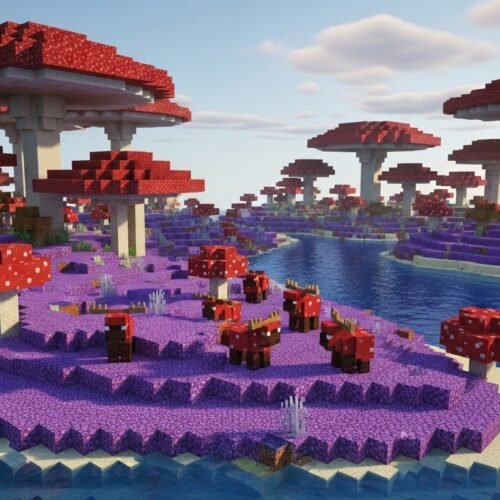
Ever found yourself dreaming of a perfect Minecraft world—one with endless Mushroom Fields, dense Jungles, or towering Badlands formations right near spawn? You're not alone. While the sheer randomness of world generation is part of Minecraft's charm, sometimes you just want to cut to the chase and start your adventure in a specific, coveted biome. The good news? Finding specific biome seeds (e.g., Mushroom, Jungle, Badlands) is entirely possible, and a lot easier than you might think.
This guide is your roadmap to pinpointing those elusive biomes, transforming hours of fruitless exploration into smart, targeted biome hunting.
At a Glance: Your Biome-Finding Essentials
- World Seeds are Key: Every Minecraft world has a unique "seed" number that dictates its entire terrain generation.
- Biome Finders are Your Best Friend: Online tools allow you to input a seed and instantly map out all biomes.
- Version Matters: Java Edition and Bedrock Edition generate worlds differently, so specify your game version for accuracy.
- Coordinates are Crucial: Biome finders provide X, Z coordinates; use them to teleport or navigate in-game.
- Rare Biomes are Out There: Don't lose hope—Mushroom Fields, Jungles, and Badlands are discoverable with the right tools.
The Allure of Specific Biomes: Why Hunt for Them?
Think about it: some biomes are more than just scenery. They offer unique resources, distinctive gameplay experiences, or simply a breathtaking backdrop for your builds.
- Mushroom Fields (Mooshroom Biome): Rare and highly sought-after, these islands are unique for their lack of hostile mob spawns, making them a safe haven. They're also the exclusive home of mooshrooms and giant mushrooms.
- Jungle Biome: A treasure trove of unique blocks like jungle wood and cocoa beans. It's also the only place to find pandas and ocelots, not to mention the thrilling challenge of navigating its dense, multi-layered canopy.
- Badlands (Mesa Biome): Instantly recognizable by its vibrant terracotta blocks and towering spires. It's a fantastic source for colored building materials and often contains exposed gold mineshafts, making early-game gold mining much easier.
- Other Gems: From the frigid beauty of Ice Spikes to the practical utility of a massive Savanna for horse breeding, every biome offers something special.
Instead of endlessly creating new worlds and hoping for a lucky spawn, a targeted approach lets you get straight to the adventure you crave.
The Seed of Your World: Understanding Minecraft's DNA
At the heart of every Minecraft world lies a "seed"—a unique numeric or alphanumeric string. This seed acts like a blueprint. When you create a new world, Minecraft's complex algorithms use this seed to generate everything: the mountains, oceans, forests, and, of course, the biomes.
If you use the same seed, on the same game version (Java or Bedrock), you will always get the exact same world layout. This predictability is what makes biome finding possible.
Your Essential Toolkit for Biome Hunting
Forget endless hours of flying in Creative mode. The most efficient way to find specific biomes involves leveraging powerful online tools.
Biome Finder Websites: Your Digital Cartographers
These dedicated websites are the cornerstone of targeted biome hunting. They take your world's seed and version, then process it through the same generation algorithms Minecraft uses, displaying a comprehensive map of all biomes.
How Biome Finders Work Their Magic:
In essence, these tools reverse-engineer the world generation process. You feed them the "input" (your seed and game version), and they output a "map" that visually represents how Minecraft would lay out the biomes for that specific seed. They don't actually create a world; they predict it based on known game logic. Think of them as incredibly advanced calculators for Minecraft's terrain.
For instance, tools like seeds.gg/biome-finder or diamondfinder.io/biomes-finder are prime examples. They offer an intuitive interface to navigate your world's potential.
Using a Biome Finder: A Step-by-Step Guide
Ready to pinpoint that perfect Mushroom Island? Here’s how:
- Obtain Your World's Seed (or Choose a New One):
- Existing World: In-game, open chat (T) and type
/seed. The number displayed is your world's seed. - New World: If you're looking for a new world with specific biomes, you can simply use a random seed (or leave the seed field blank in the biome finder, and it will generate a random one for you to then explore). You can even generate Minecraft world seeds specifically designed for certain features.
- Identify Your Game Version:
- Java Edition: Note your exact version (e.g., 1.19, 1.20.4). This is critical, as world generation can change significantly between major updates.
- Bedrock Edition: Similarly, note your version (e.g., 1.19.70, 1.20.12).
- Head to Your Chosen Biome Finder Website:
- For this example, let's say you're using
diamondfinder.io/biomes-finder.
- Input Your Data:
- Locate the "Seed" field and paste your world seed.
- Select your "Game Version" from the dropdown menu (e.g., Java 1.20, Bedrock 1.19). It's crucial to select the correct edition (Java or Bedrock) as well as the specific version number.
- Generate the Map:
- Click "Find Biomes" or a similar button. The website will then render a detailed map of your world.
- Interpret the Map:
- The map will display different colors representing various biomes. Most biome finders have a legend to help you identify what each color means.
- Use the navigation controls (zoom, pan) to explore.
- Look for your desired biome—be it the iconic pink of a Mushroom Fields biome, the dark green of a Jungle, or the striking oranges and reds of Badlands.
- When you locate a promising area, hover over it (or click) to see its exact X and Z coordinates.
- Navigate In-Game:
- Once you have the coordinates (e.g., X: -1500, Z: 200), jump back into your Minecraft world.
- Open chat (T) and type
/tp @s -1500 ~ 200(replace@swith your player name if playing multiplayer, and the~for the Y-coordinate will place you safely on the surface). - You should now be teleported directly to or very near your target biome!
Pro Tip: If you don't want to use teleport commands, note down the coordinates and simply use your in-game map (F3 on Java, or map item) to guide your natural exploration. Just remember: Minecraft maps don't show specific biome names, only general terrain features.
Seed Libraries and Databases: Discovering New Worlds
What if you don't have a specific seed in mind, but you know you want a world with a huge Jungle or a Mushroom Island right near spawn? That's where seed libraries come in. Websites like seeds.gg often curate lists of "best seeds" categorized by biome or feature.
These databases allow you to browse seeds that other players have discovered and shared, often with screenshots and detailed descriptions of what makes them special. You can search for "Jungle spawn," "Mushroom Island seed," or "Badlands near spawn" and instantly get a list of seeds to try. This is an excellent way to start a new adventure with a guaranteed exciting start.
Manual Exploration: The Old-Fashioned Way (Less Efficient for Specifics)
Of course, you can always explore your world the old-fashioned way. Wander, sail, fly—eventually, you'll stumble upon new biomes. However, if your goal is a specific, rare biome like a Mushroom Fields or a large Jungle, this can be incredibly time-consuming and frustrating.
Manual exploration is best for players who enjoy the journey and the surprise, not for those with a targeted biome in mind. For efficiency, stick to the digital tools.
Specific Biomes Spotlight: What Makes Them Truly Special?
Let's dive a little deeper into why these particular biomes are so coveted and what you can expect once you find them.
The Enchanting Mushroom Fields (Mooshroom Biome)
- Rarity: Among the rarest biomes in Minecraft, often appearing as isolated islands in vast oceans.
- Unique Mobs: The exclusive home of the Mooshroom, a red cow variant that can be milked for mushroom stew. Shearing them turns them into regular cows and drops mushrooms.
- No Hostile Mobs: Perhaps its greatest perk. Zombie, Skeleton, Creeper, and Spider spawns are suppressed here, making it an incredibly safe place to build and explore, especially at night.
- Resources: Huge mushrooms (harvestable for brown and red mushrooms), mycelium (a unique block that acts like dirt but prevents grass growth and allows mushrooms to grow in any light level), and often large surrounding oceans for easy access to sea pickles and ocean monuments.
- Search Tips: Biome finders will highlight these biomes in a distinct pinkish-purple color. They are almost always surrounded by deep ocean.
The Lush, Layered Jungle Biome
- Unique Flora: Towering jungle trees (up to 30 blocks tall!) provide an abundance of wood. Cocoa beans grow on these trees, essential for brown dye.
- Exclusive Mobs: Home to the adorable pandas (which can be bred with bamboo) and ocelots (which can be tamed into cats).
- Terrain Challenges: Navigating a jungle can be tricky due to its dense foliage and multi-layered terrain, but this also makes it an excellent place for hidden bases and parkour challenges.
- Structures: You'll find jungle temples here, containing puzzles and valuable loot.
- Resources: Besides wood and cocoa, bamboo (useful for scaffolding and fuel), melons, and occasionally parrots can be found.
- Search Tips: Look for large, dark green patches on the biome finder map. They often border plains, savannas, or rivers.
The Striking Badlands Biome (Mesa)
- Distinctive Blocks: Its most defining feature is the colorful terracotta (clay) blocks, appearing in multiple hues naturally. Beneath the surface, you'll often find hardened clay.
- Valuable Resources: Badlands biomes are famously rich in gold ore, especially in exposed ravines and abandoned mineshafts that frequently generate above ground here. This makes early-game gold acquisition much easier.
- Sparse Vegetation: Trees are rare, mostly limited to oak and dark oak on higher elevations. Cacti and dead bushes are common.
- Terrain: Characterized by flat-topped mountains, spires, and sometimes "eroded" sections with dramatic canyons.
- Search Tips: On biome finders, Badlands appear in bright orange and red tones. They are usually expansive and distinct.
Java vs. Bedrock: Why Your Game Version Really Matters
This is arguably the most critical factor after the seed itself. Minecraft exists in two primary editions: Java Edition (for PC, Mac, Linux) and Bedrock Edition (for Windows 10/11, consoles, mobile).
They do not generate worlds the same way.
- A seed entered into Java will produce a vastly different world from the same seed entered into Bedrock.
- Furthermore, even within the same edition, significant updates (like 1.18 "Caves & Cliffs: Part 2" or 1.19 "The Wild Update") can drastically change world generation algorithms. A seed that spawns you in a jungle in 1.17 might place you in a desert in 1.18 if the underlying generation code for that version was altered.
Always, always double-check and select the correct edition and specific version (e.g., Java 1.20.4, Bedrock 1.19.70) when using a biome finder. Failing to do so will give you inaccurate results, leading to frustration.
Common Pitfalls and Pro Tips for Biome Hunters
Even with the best tools, a few things can trip you up. Here’s how to avoid them and streamline your search:
- Double-Check Your Input: It sounds obvious, but a misplaced digit in your seed or selecting the wrong game version is the leading cause of "my biome finder isn't working!" issues. Always verify.
- Understand Coordinates: Minecraft uses X and Z for horizontal position, and Y for vertical. Biome finders usually give you X and Z. Remember that positive X is East, negative X is West. Positive Z is South, negative Z is North.
- Utilize the
/tpCommand (Responsibly): For finding biomes, the/tpcommand is a massive time-saver. If you're on a survival server and it's disabled, you'll need to trek the old-fashioned way or ask an admin for help. For single-player, ensure cheats are enabled. - "Nearest" Isn't Always "Best": A biome finder might show a tiny patch of Jungle 500 blocks away, but a huge, magnificent Jungle biome might be 2000 blocks away. Consider distance vs. quality when choosing your destination.
- Biome Blending: Sometimes, biomes transition smoothly. A biome finder shows a grid, but in-game, you might find a blended border rather than a sharp line. This is normal.
- Consider Future Updates: If you find a fantastic seed for version 1.20, remember that a future 1.21 update could change how that seed generates. If you're building extensively, it might be wise to stick to a stable version for that world.
- Look for Multiple Biomes: Many players aim for "mega seeds" that have several desirable biomes close to spawn. Use the biome finder to scan the area around (0,0) for your perfect cluster.
- Offline Access: Some advanced biome tools might allow you to download world data for offline use, though this is less common for simple biome finding.
Beyond Just Biomes: Exploring Other World Generation Tools
Once you master biome finding, you'll realize the power of understanding Minecraft's world generation. This same principle extends to other features:
- Structure Finders: Just like biome finders, many tools can also pinpoint specific structures like Villages, Strongholds, Ocean Monuments, End Cities, Woodland Mansions, and even Ancient Cities. This is invaluable for late-game progression or specific farming needs.
- Slime Chunk Finders: If you need a reliable source of slimeballs, specific tools can show you "slime chunks" where slimes can spawn below Y=40, regardless of light level.
- Minecart Track Generators: While not directly related to finding biomes, some tools can help plan optimal Nether travel routes, indirectly helping you reach distant surface biomes faster.
Understanding these tools fundamentally changes how you interact with Minecraft's vast worlds, turning what used to be a game of chance into a game of strategy.
Your Next Great Adventure Awaits
No more spawning into endless plains when your heart craves the vibrant hues of a Badlands mesa or the mysterious depths of a Jungle. With the right seed, the correct game version, and a trusted biome finder, you're now equipped to take control of your Minecraft destiny.
Whether you're planning an epic build in a Mushroom Fields sanctuary, setting up a panda farm in the heart of a Jungle, or striking it rich in a Badlands gold mine, the power to choose your starting environment is now literally at your fingertips. Happy hunting, and may your next Minecraft world be exactly the adventure you've been dreaming of.